Where Does 97% of Your TikTok Traffic Disappear? Solving the In-App Browser 'Black Hole' Mystery 🕵️♂️
Is your TikTok Ads manager proudly reporting thousands of clicks while GA4 shows near zero? Discover why iOS In-App Browsers swallow your campaign traffic and how to fix it.
Picture this: your TikTok Ads Manager proudly reports 10,000 clicks on your brand new campaign. Excitedly, you log into Amplitude or Google Analytics 4 to check the conversions, only to find... 300 sessions. A drop-off of 97%.
Before you declare that TikTok "doesn't sell" and burn through the rest of your budget, it's time to look under the hood. Chances are, you've fallen into a trap that is the bane of modern e-commerce: the In-App Browser barrier, especially on iOS.
Here is the step-by-step guide on how I diagnosed and solved exactly this issue. Learn how to conduct a technical audit to save your ad budget!
Step 1: Separating Noise from Facts – How to Properly Debug a TikTok Link
The first suspicion is always incorrect UTM tagging. To rule this out, you must test the ad in the exact environment and in the same way your potential customer sees it (inside the mobile app).
Here is the step-by-step guide to generate and test the ad preview in a horizontal "text and image" layout:
💻 Phase A: Generating the QR Code in TikTok Ads Manager (Desktop)
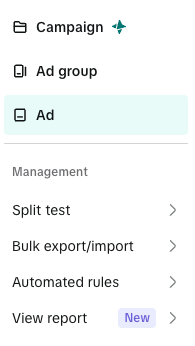
Select Ads Level
Log into your TikTok Ads Manager account, go to the Campaigns tab, and switch to the Ads level.
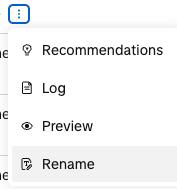
Open the Preview Menu
Locate the creative generating the most "empty" clicks. Hover over it, click the three-dots (...) icon, and select the Preview option.
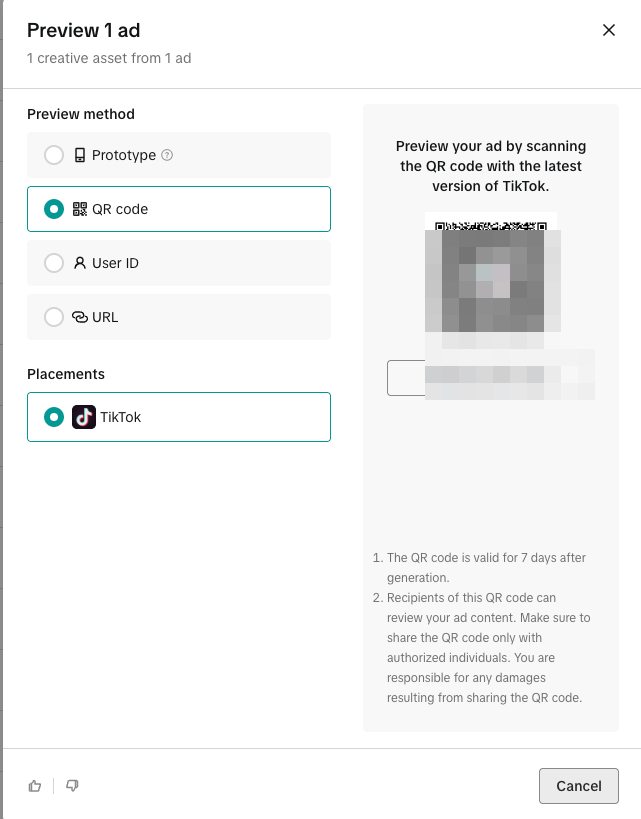
Generate the QR Code
In the pop-up window, select the QR code preview method and ensure TikTok is checked under Placements. An active, fully anonymized QR code will display.
📱 Phase B: Scanning inside the TikTok Mobile App (Smartphone)
[!WARNING] Do not scan the QR code with your phone's default camera app! The default camera will open the link in your native browser (Safari/Chrome), whereas we must test inside TikTok's native In-App browser.
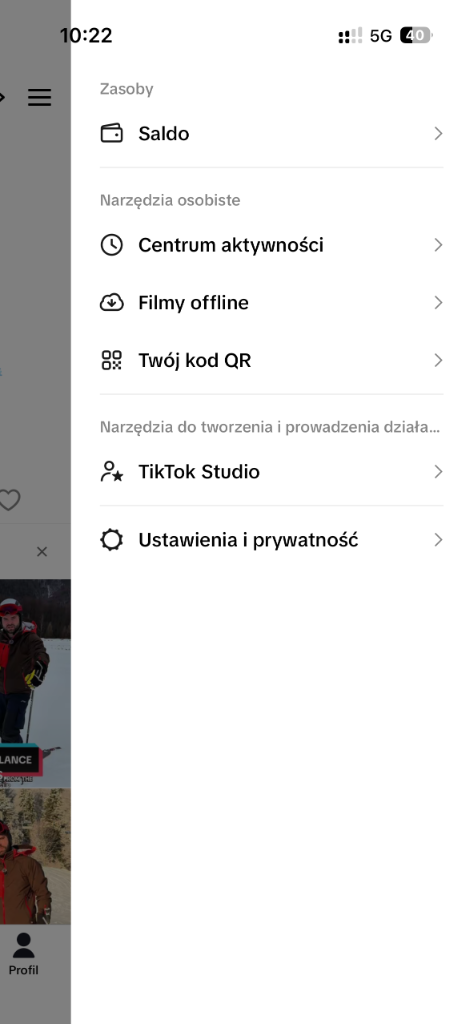
Open QR Menu in TikTok
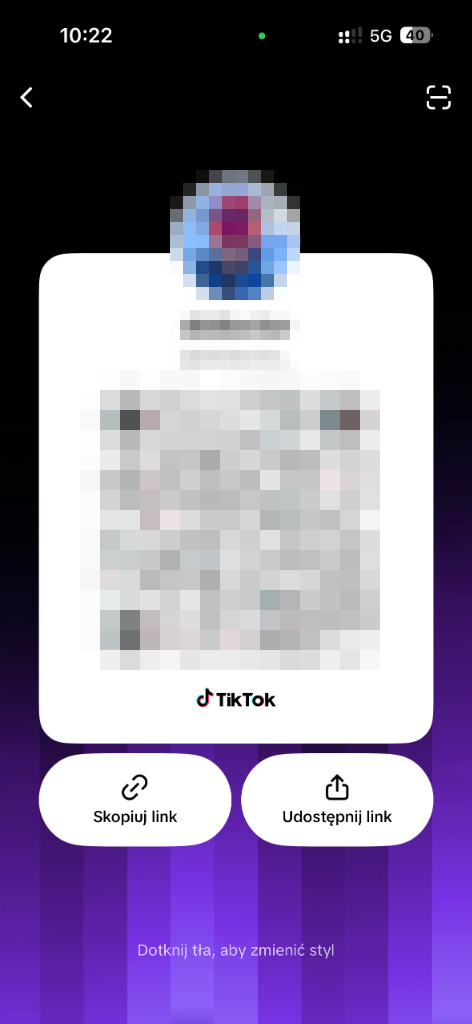
Open the TikTok app, navigate to your Profile tab (bottom-right), open the side drawer, and tap Twój kod QR (Your QR Code).
Open the Built-in Scanner
On your QR code screen, tap the scanner icon in the top-right corner. Scan the preview QR code from your computer screen. The ad is now assigned to your test feed.
🔎 Phase C: Live Testing (UX and UTM Analysis)
6. Trigger the Ad in the Feed
Go to the TikTok home feed and open the For You tab. Refresh the feed or swipe past 1-2 videos. Your test ad will appear labeled as Sponsored.
7. Open the Landing Page
Click the ad's CTA button (e.g., “Shop Now” or “Learn More”) to open the In-App browser.
8. Verify the URL Address
Once the page loads, copy the full URL from the browser address bar. Check if the final link contains fully resolved dynamic macros (e.g., __CAMPAIGN_ID__ replaced with actual digits) and UTM parameters:
https://www.yourstore.com/category?utm_source=tiktok&utm_campaign=summer_sale&ttclid=E_C_P...
If the link matches the format above, your tagging works flawlessly. This means the problem lies a layer deeper, in the behavior of the in-app browser itself.
Step 2: Where Did TikTok Go in Analytics?
If you don't see any traffic from a browser named "TikTok" in your analytics panel, that's actually... perfectly normal! Due to Apple's privacy guidelines, the built-in browser inside TikTok on iOS uses the WebKit engine.
Analytics systems identify these visits simply as "Safari" or "Safari UI/WKWebView". To extract campaign traffic, apply a filter in GA4 or Amplitude:
utm_source = tiktok
Do you see Safari sessions under this filter? Great! It means your analytics script is capable of parsing parameters when it manages to load. So why is the session count so low?
Step 3: The Click Cemetery (UX Problems)
We have thousands of clicks and perfect links, yet only a fraction of sessions. What killed the rest of the visits? The culprit is almost 100% the interface wall of the In-App Browser:
- Blocked Cookie Consent Banner (Consent Mode): TikTok's bottom navigation overlay physically covers the "Accept" button on your cookie banner. Users cannot click consent, get frustrated, and leave. Your analytics scripts never fire.
- Murderous Page Reloads: Some websites trigger a hard reload of the window after the user accepts cookies. In-app browsers hate this and often strip URL parameters (including the critical
ttclidparameter) or block loading altogether. - Slow Script Loading: In-app browsers load external assets slower. If your Google Tag Manager script is set to load at the very end of the sequence, the user will exit the page before they can even be measured.
How to Fix It? 🛠️
- Optimize your Cookie Consent Banner for mobile: Make sure your consent modal is absolutely not covered by in-app overlays. Test this using a physical mobile device via the Ad Preview flow. Design a responsive banner that fits WKWebView dimensions.
- Rearrange Loading Priorities: Move analytics scripts higher in your document hierarchy so they execute immediately after the user gives consent. Ensure GTM loads asynchronously but high up in the
<head>. - Use Smart Links (Deep Linking): In severe cases, deploy deep linking tools (such as URLgenius or Branch) to "push" users out of TikTok's built-in browser and directly into their phone's native browser (Safari/Chrome). There, your site will load stably and track visits correctly.
TikTok drop-offs will always be slightly higher due to the fast-paced nature of the platform, but a loss of 90%+ is a technical failure of your site or tracking setup, not a fault of the TikTok algorithm.
How is your TikTok ads tracking performing? Have you faced similar in-app browser analytics mysteries? Let me know in the comments! 👇